One worktree per task: how I run parallel AI coding agents with herdr and pi
My day-to-day setup for running several AI coding agents at once on a remote dev box, without them stepping on each other or on main.
For the last few months most of my coding has gone through AI agents. Not one chat window on the side, but several agents working at the same time on real tasks, opening pull requests I review and ship.
The hard part wasn't getting an agent to write code. It was everything around it: agents editing the same files, someone (me, usually) committing straight to main, sessions dying when my laptop slept, and no clear point where a task was actually done.
This post is the setup that fixed that for me: herdr for the workspace, pi for the coding, and a handful of rules that each came from something breaking.
The two layers
I think of it as two separate jobs.
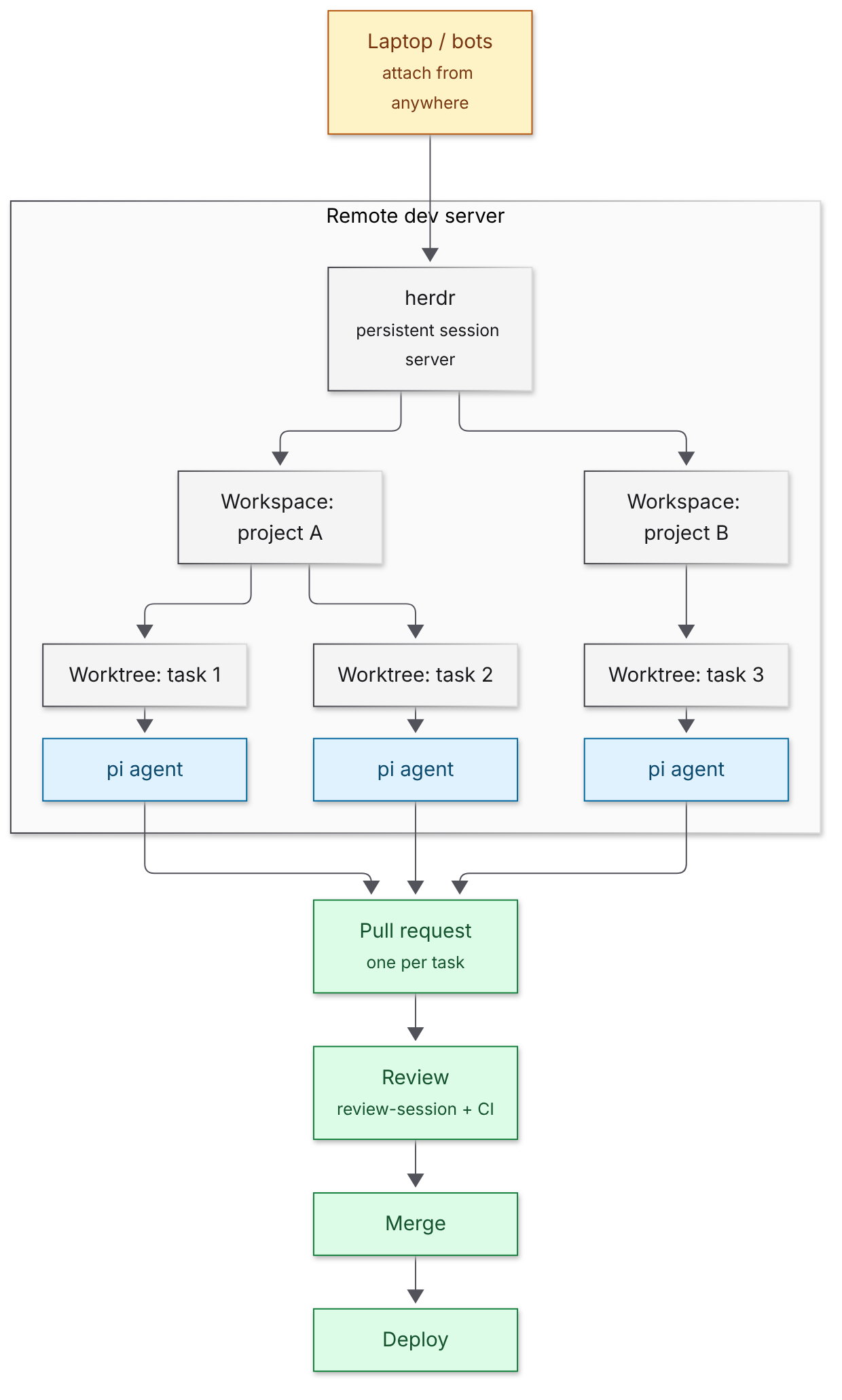
herdr is the workspace layer. It's a terminal session server that runs on a remote dev box, with one workspace per project. Every task gets its own git worktree, branched from origin/main, so it sits next to the main checkout and never touches it. Because the sessions live on the server, not my laptop, I can attach from anywhere, and so can the agents:
herdr --machine devboxpi is the coding agent. It runs inside a worktree: it reads the repo, writes the code, runs the tests, and it can switch between model providers. It also has skills, small reusable routines it runs on request. The one I lean on most is a review-session pass that reviews the work before anything is called done.
So herdr gives each agent a clean, isolated place to work, and pi does the work there. Because every task has its own worktree, I can run several pi agents in parallel, one per worktree, and they never collide.
The keybindings I actually use
Most of the workflow above happens through a few herdr keys rather than commands.
| Keys | What it does in my flow |
|---|---|
ctrl+b |
The prefix: every key below starts with it. It's herdr's default, and I haven't changed it |
prefix+shift+g |
New worktree for a task |
prefix+w |
Jump between workspaces |
prefix+shift+w |
Switch to a task's worktree, or create one from the default branch (I rebound this from rename-workspace to a worktree picker plugin) |
prefix+shift+backspace |
Remove a finished task's worktree (same plugin; D in it also deletes a branch that isn't merged yet) |
prefix+o |
Jump to the pane an agent notification came from |
prefix+z |
Zoom into one agent's pane |
prefix+q |
Detach, leaving every agent running on the server |
A real task, start to finish: moving this blog
The site you're reading was itself moved this way. It used to run on a managed hosting platform; now it runs on a server I already pay for and that sits idle most of the time. One less platform, one less bill, and the switch over (or back) is a single DNS change.
1. Create a worktree for the task.
herdr --machine devbox worktree create \
  --cwd <repo> \
  --branch <branch> \
  --base origin/main \
  --label <short-name>
The task now has its own branch and folder. Main stays clean, and if I want to throw the attempt away, I delete the worktree and nothing else is affected.
2. Start pi in that worktree and give it the outcome, not the steps. Something like "move the blog to the new host, keep the same URLs, and make the deploy repeatable." pi reads the repo, makes the changes and runs the tests.
For the blog, pi added a Dockerfile and bumped Next.js.

3. Review before it's done. pi runs review-session on its own changes and fixes what it finds. Only then does it open a pull request.
4. Dry-run the deploy. Before any real deploy, I do a dry run so every blocker shows up at once, instead of one failure at a time in production.
For the blog, that meant building and running it on the new server first, then checking the whole site on a temporary test address before touching the real domain.
5. Merge, deploy, clean up. Squash-merge once review is clean and CI is green, deploy for real, then remove the worktree.
For the blog, deploying for real was the DNS switch. There was no noticeable downtime. I kept the old platform around briefly as a fallback, then deleted it.
Not everything went smoothly. A security audit flagged the framework version I'd planned to upgrade to, so I went to a newer release instead. The stricter build then failed type-checking on some old test files. And a small build change quietly broke auto-deploys on the old platform, which I only noticed because I was keeping it as a fallback. The dry run surfaced most of this, and the review-before-merge pass caught the CI failure.
What broke, and the rules that came out of it
Every rule below exists because I skipped it once.
- One task per worktree, and no work in main. Two agents in one folder will eventually overwrite each other, and "just a quick fix on main" is how surprises reach production.
- Test the model provider before starting parallel agents. If the provider is down or rate-limited, you find out once, not five times in five worktrees.
- Run review-session before merging. An agent saying "done" isn't the same as the work being done. A separate review pass catches what the first pass glossed over.
- Dry-run before every deploy. It's cheap, and it shows every blocker together.
- Clean up worktrees afterwards. Old worktrees pile up quickly and make it unclear what's still in flight.
What I'd tell you if you want to try this
- Start with one project and one agent. The worktree-per-task habit matters more than parallelism.
- Put sessions on a server, not your laptop. Being able to attach from anywhere is what makes running agents in parallel practical.
- Give agents outcomes and a definition of done, then make review a required step, not a nice-to-have.
- Write your rules down where the agents can read them. Most of my rules started as a sentence I got tired of repeating.
What's next
Next I'll walk through a bigger example: a set of features built in parallel this way for deploy-manager, a small deploy tool I run.
If you're running agents in a similar way, or a very different one, I'd like to hear what's working for you.